The internet is an ocean. Help your kids surf it safely.
Shaka Surf is a safe browser built for kids that grows with them. Shaka Safe is the app that helps you keep watch. Your kid starts in water you choose and earns more as they show you they’re ready, so you never have to choose between locking it all down and handing it all over.
Shaka Surf
The kids’ browser
Today’s tide report
Harvey visited 12 sites, all inside allowed sites. Nothing flagged.
Shaka SafeThe parent “lifeguard” app
You shouldn’t have to choose between total lockdown or open access.
Lock it down, and it feels like you’re a spy working against your kid. Hand over the full internet, and you’re turning a blind eye. Shaka’s answer is a safe browser that grows up with your kid, opening a little more each time they show you they’re ready.
Shaka Surf has filters for over 9 categories and for every age so only age-appropriate content gets through. Plus, you always have access to every page visited in Shaka Safe. Learn more
You are the lifeguard.
Shaka Safe lives on your phone. You see where your kids surfed and what got flagged. Open up restrictions as kids grow up and show you they’re ready for more.
Conversations, not secrets.
Kids always know what you can see. Shaka suggests prompts to help you and your kids have meaningful conversations about content online to build relationships.
how to set it up
Surf the web safely in two minutes
Two apps, one family. You get Shaka Safe. Kids get their own browser, Shaka Surf.
1
Download Shaka Safe for Parents
Download the parent app, Shaka Safe, onto your phone. Set up kid accounts and select from preset preferences. (Takes about 1 min.)
Shaka Safe for Parents
2
Download Shaka Surf for kids
Download the safe browser app, Shaka Surf, on your kids’ devices. Pair from the Shaka Safe app and be involved from the beginning.
Shaka Surf browser for kids
3
Hit the water!
Shaka Surf has a unique experience for each age group. Younger kids have only allowed sites, while older children have more latitude. Learn more
The four age levels
Every kid gets the internet access they’re ready for.
Select the level for your kid to set up a unique experience in their browser, catered to their phase of life. (Ages below are just a guide.) Shaka Surf grows with your kid, from a small cove of only allowed sites to open water with content filtering at every level. As their lifeguard, you can manage requests, new sites, and always view the sites they surf.
The Cove
Pipages 1 to 4
Starting to tap around.
A cove of allowed sites just for young kids, an easy user experience, and nothing else. Shaka picks age-appropriate sites to start, and you add the rest.
Included: Allowed sites only
Not included: Search, with safe search locked on
Not included: The open internet
Not included: Ask to surf here
Not included: Some social sites allowed
Included: Wave Watch™ on every page
The Reef
Squidages 5 to 9
Starting to read, does homework online, explores new subjects.
Allowed sites, one tab at a time, and a search box with safe search locked on. They can open a result, one hop, and Wave Watch™ reads whatever is there.
Included: Allowed sites only
Included: Search, with safe search locked on
Not included: The open internet
Included: Ask to surf here
Not included: Some social sites allowed
Included: Wave Watch™ on every page
The Shore
Gromages 10 to 14
Looks things up on their own for school and hobbies.
Mostly open internet, with safeguards around social media. When something gets covered, they see the reason and a button to ask you.
Not included: Allowed sites only
Included: Search, with safe search locked on
Included: The open internet
Included: Ask to surf here
Not included: Some social sites allowed
Included: Wave Watch™ on every page
Open Water
Charger15 and up
Hangs out with friends, needs internet access for homework and games.
Mostly the open water, with lesser restrictions than Grom. Wave Watch™ warns more than it covers, on a timeline you both can see.
Every page gets filtered before your kid views it.
A blocklist only knows about yesterday’s internet. Wave Watch™ is the layer behind-the-scenes that scans every page as it loads in Shaka Surf and determines its appropriateness. Scanning happens on the device itself. An inappropriate site gets flagged, with the option to start a conversation with you about it. For your older children, you can fine-tune the settings to what works for your family for each category.
Shaka Surfa Grom’s screen
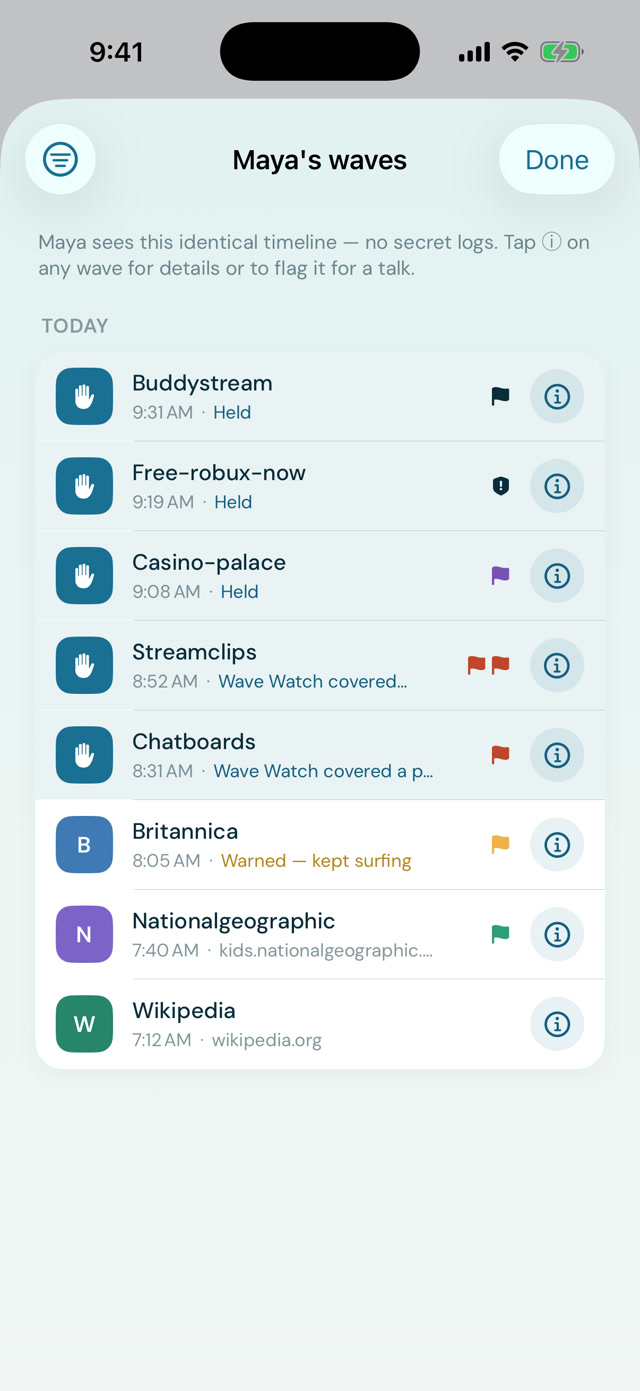
Your kids browsing history appears on both their device and yours, allowing both of you to initiate a conversation when ready.
filtering that’s flexible for you and your kids
Example page
Pipages 1 to 4
Squidages 5 to 9
Gromages 10 to 14
Charger15 and up
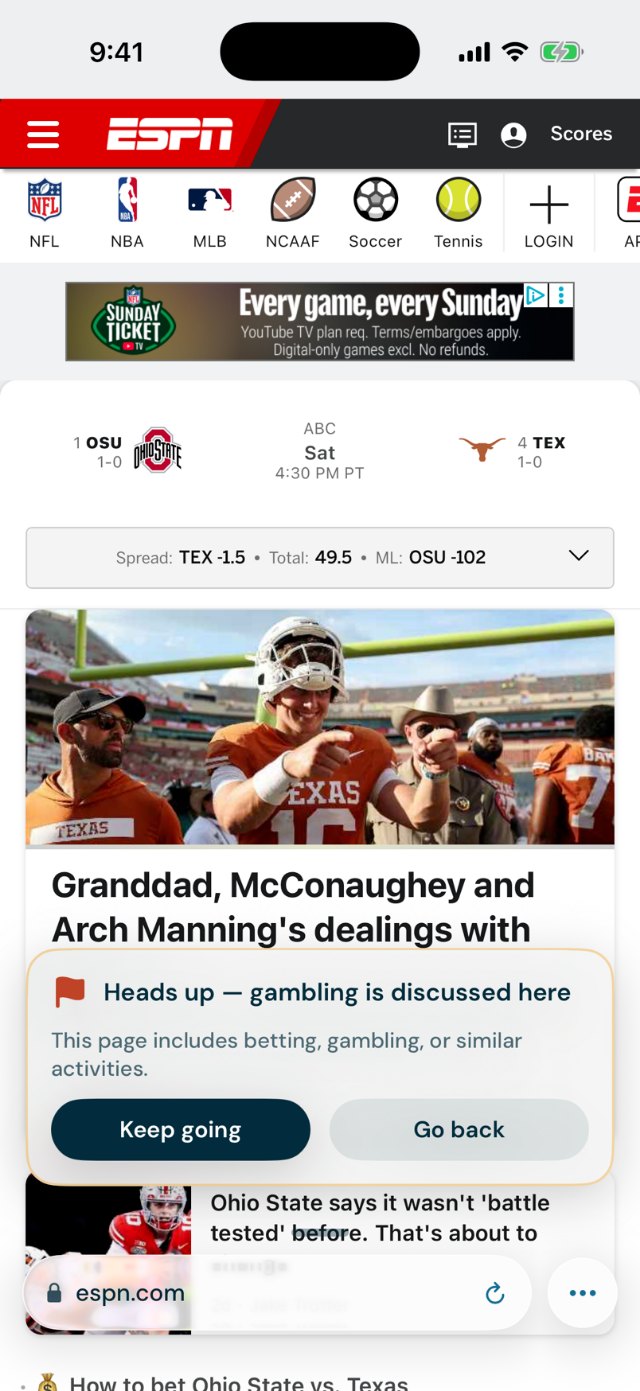
A page with adult content
Covered
Covered
Covered
Covered
Zero tolerance at every age.
A sports article with a betting ad
Not in the cove
Covered
Warned*
Let through*
A gaming forum with some mild talk of violence
Not in the cove
Covered
Warned*
Let through*
*You can configure strictness in the app.
Adult content is covered at every age level, no exceptions. For everything else, you set how strict Wave Watch™ leans for each age level from your phone using Shaka Safe.
Ask to surf here
A flag starts the conversation.
When something gets flagged, your kid can start a conversation with you. The request comes to your Shaka Safe app, where you can open it up, adjust settings, or flag it for a later conversation.
Shaka Surffor kids
Maya hits a site outside her surf zone. Instead of a dead end, she can request access or start a conversation with her parent.
Shaka Safefor parents
Her ask lands in your Requests inbox with the reason. Tap “Open it up,” pick once, an hour, or for good, and it’s open.
Kids often feel ashamed or frustrated when they see a blocked page. Starting a conversation helps both you and your kid recognize that nobody is to blame for flags, it’s just the water we swim in.
Shaka Safefor parents
A glance at the water, from your own phone
Each week, you’ll receive a “Tide Report” showcasing trends, flags during the week, and what your kid is finding interesting. As always, these are meant to start conversations, not meant to be a surveillance of your kids online.
Approve “Ask to surf here” requests with one tap
See every flag with the reason, so you can talk about it
Receive a weekly “Tide Report” so you can keep track of trends
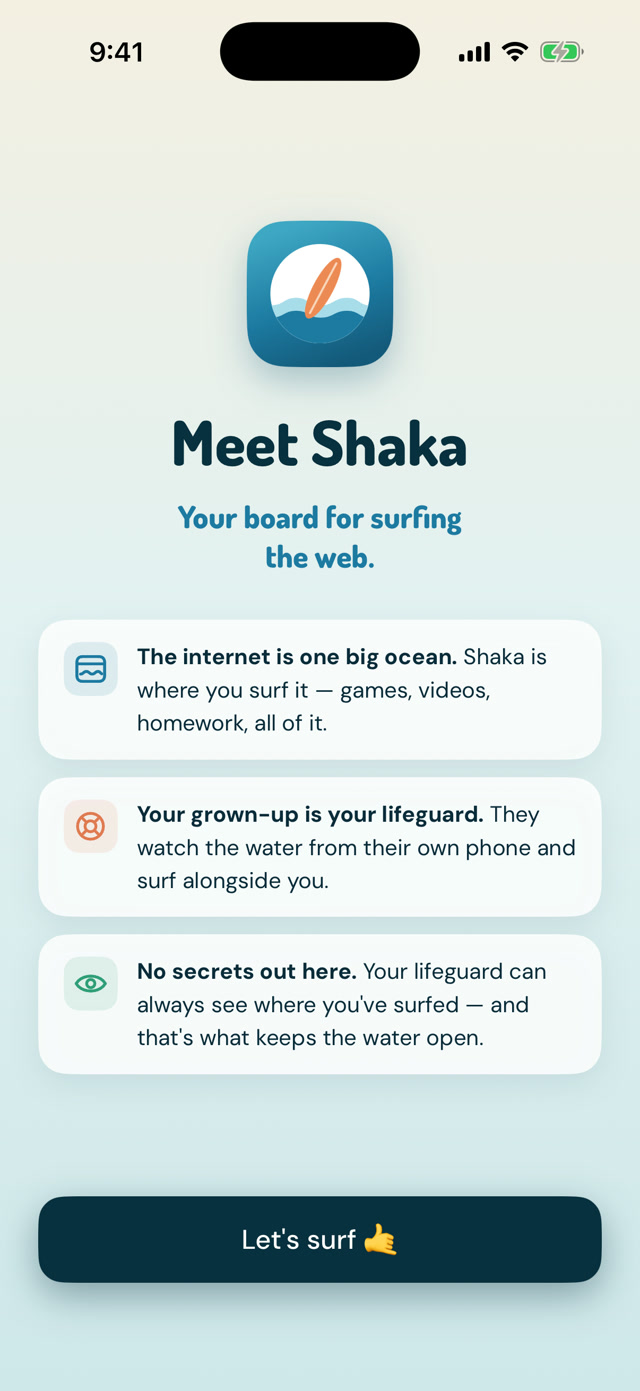
Kids know what their parent can see. It’s on the first screen they ever meet. The safest kid on the internet isn’t the one who is completely locked down. It’s the one who has healthy, open communication with a safe parent without shame. Just like the ocean, the internet can be a beautiful and dangerous place. That’s why you’re there to help them surf safely.
Shaka Surfwhat your kid sees
Shaka Safewhat you see
Shaka helps families build relationships and have healthy conversations. Not monitor each other.
Ready to paddle out?
Shaka is almost ready for families. Join the waitlist and you’ll get one email the day it lands on the App Store, and a short note now and then before that.